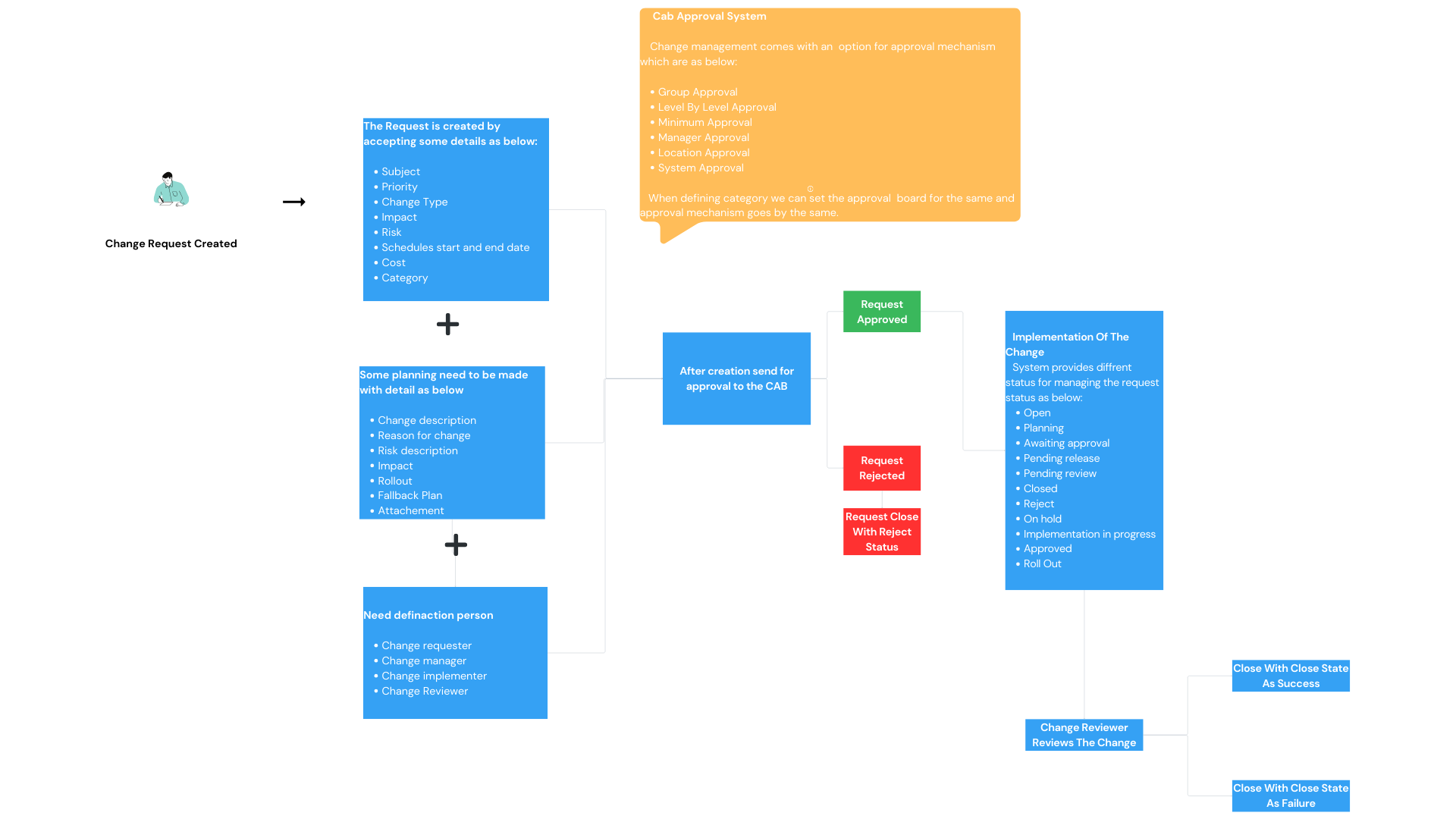
Change Management
1. Introduction This document defines the process and guidelines for managing changes within the system/application. The goal is to ensure that all changes are implemented in a controlled and systematic manner, minimizing risks and service disruptions.
2. Objective
- Ensure smooth implementation of changes
- Minimize risk and impact on existing services
- Maintain proper tracking and documentation
- Improve communication among stakeholders
3. Scope This process applies to:
- Application changes
- System configuration updates
- Bug fixes and enhancements
- Infrastructure-related changes
4. Types of Changes
-
4.1 Standard Change
- Pre-approved changes
- Low risk and frequent
- Example: Minor configuration updates
-
4.2 Normal Change
- Requires approval before implementation
- Medium to high risk
- Example: New feature deployment
-
4.3 Emergency Change
- Urgent changes required to fix critical issues
- Fast-track approval process
- Example: Production issue fix
5. Change Management Process
Step 1: Change Request (CR)
- A change request is raised by the requester
- Includes details like description, impact, and priority
Step 2: Review & Analysis
- Technical team evaluates: Risk Impact Dependencies
Step 3: Approval
- Change is reviewed by authorized personnel (Manager/CAB)
- Approval or rejection is provided
Step 4: Implementation
- Approved changes are scheduled and implemented
Step 5: Review
- Verify that the change works as expected
Ensure no negative impact
Step 6: Closure
- Change request is closed after successful implementation
- Documentation is updated
6. Roles and Responsibilities
| Role | Responsibility |
|---|---|
| Requester | Raise change request |
| Change Manager | Review and approve changes |
| Developer/IT Team | Implement changes |
| CAB | Provide approval if required |
| Review | Validate changes |
7. Change Request Details
Each change request should include:
- Title
- Description
- Change Type
- Priority
- Impact
- Risk Level
- Requested By
- Approval Status
- Implementation Date
8. Risk & Impact Assessment
- Low Risk: No major impact on system
- Medium Risk: Limited impact
- High Risk: Critical system impact
9. Rollback Plan
In case of failure:
- Restore previous version
- Revert database changes
- Notify stakeholders
10. Benefits of Change Management
- Controlled and structured changes
- Reduced system downtime
- Improved transparency
- Better accountability
11. Conclusion
A well-defined Change Management process ensures that all system changes are handled efficiently, reducing risks and improving overall system stability.