Batches
Batch Module - Mailroom Management System
The Batch module is used to create and manage parcel batches in a structured way.
Key Features
-
Vendor Selection
- Users must select a courier vendor while creating a batch.
- Each batch is linked to a specific vendor.
- Ensures vendor-wise data separation and prevents mismatch.
-
Digital Signature
- The system allows capturing a digital signature from the vendor.
- Used for verification and proof of handover or approval.
-
Number of Items
- Users can define the total number of items in a batch.
- Controls the maximum number of parcels allowed in the batch.
- Prevents adding more items than defined.
-
Batch-wise Parcel Management
- Parcels can be added only to the selected batch.
- Enforces item limits based on defined quantity.
-
Validation Rules
- Required fields must be filled before submission.
- Prevents invalid or incomplete batch creation.
Add New Batch (Modal Form)
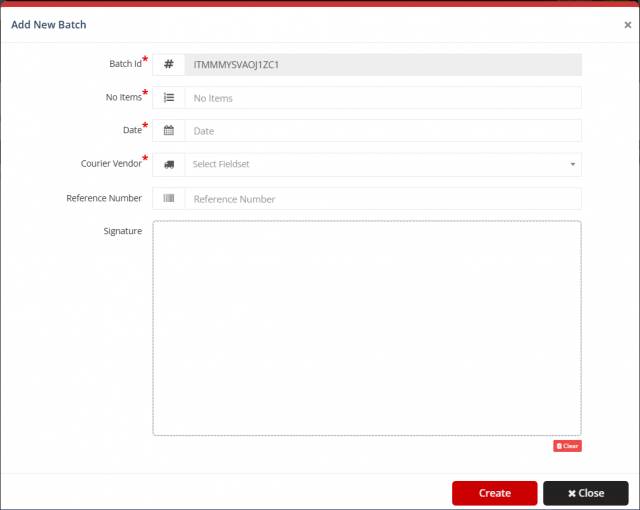
The system provides an "Add New Batch" modal for creating a new batch. This modal contains the following fields:
-
Batch ID
- Auto-generated unique identifier for each batch.
- Read-only field.
-
No. of Items
- Required field.
- Defines the maximum number of parcels/items allowed in the batch.
-
Date
- Required field.
- Used to record the batch creation or processing date.
-
Courier Vendor
- Required dropdown field.
- User must select a vendor; batch will be linked to this vendor only.
-
Reference Number
- Optional field.
- Can be used for tracking or external reference.
-
Signature
- Area to capture the vendor’s digital signature.
- Includes a clear option to reset signature input.
Batch Listing (Table View)
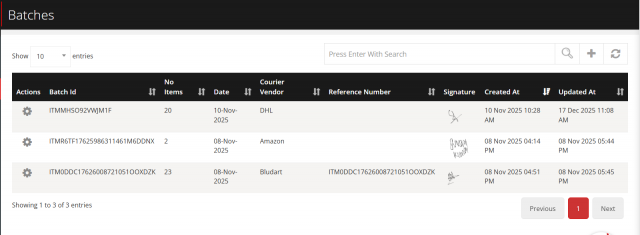 The system displays all created batches in a tabular format for easy management and tracking.
Table Columns
-
Actions
- Perform operations like view, edit, or manage batch.
-
Batch ID
- Unique identifier for each batch.
-
No. of Items
- Total items assigned to the batch.
-
Date
- Batch creation or processing date.
-
Courier Vendor
- Vendor associated with the batch.
-
Reference Number
- Optional tracking reference.
-
Signature
- Displays stored vendor signature.
-
Created At
- Timestamp when batch was created.
-
Updated At
- Timestamp of last modification.
Listing Features
-
Search
- Global search to filter batches by any field.
-
Sorting
- Column-wise sorting (ascending/descending).
-
Pagination
- Navigate through multiple pages of batch records.
-
Entries Control
- Select number of records displayed per page.
-
Refresh
- Reload latest batch data.
-
Add New Batch
- Quick access button to open batch creation modal.
Actions
-
Create
- Saves the batch with validation.
-
Clear (Signature)
- Clears the signature pad.
-
Close
- Closes modal without saving.
-
Row Actions
- Manage individual batch operations from listing.
Benefits
- Maintains data accuracy
- Enforces vendor-based restrictions
- Prevents over-allocation of items
- Provides secure verification using digital signatures
- Improves tracking and batch management
- Enhances usability with search, sorting, and pagination
We are continuously improving our documentation to ensure it meets your needs. This document will be updated regularly, so please check back for the latest information. If you have any questions or encounter any issues, feel free to reach out to us at support@itassetmanagement.in.